docker设置国内镜像源
docker设置国内镜像源
一、国内加速地址
1、阿里云镜像站:(需登录,免费)
https://<your_code>.mirror.aliyuncs.com
2、网易云镜像站:
http://hub-mirror.c.163.com
3、百度云镜像站:
https://mirror.baidubce.com
4、上海交大镜像站:
https://docker.mirrors.sjtug.sjtu.edu.cn
5、南京大学镜像站:
https://docker.nju.edu.cn
以下连接不公开或已失效:
1、Docker 中国官方镜像:(已关闭)
https://registry.docker-cn.com
2、中国科技大学 USTC:(仅供内部访问)
https://docker.mirrors.ustc.edu.cn
阿里云容器 生成自己的加速地址
登录:cr.console.aliyun.com
点击“创建我的容器镜像”,得到专属加速地址。
二、修改方法
创建或修改 /etc/docker/daemon.json 文件,修改为如下形式
解释{
    "registry-mirrors": [
        "https://registry.hub.docker.com",
        "http://hub-mirror.c.163.com",
        "https://mirror.baidubce.com",
        "https://docker.mirrors.sjtug.sjtu.edu.cn",
        "https://docker.nju.edu.cn"
    ]}
加载重启docker
systemctl restart docker
查看是否成功
docker info
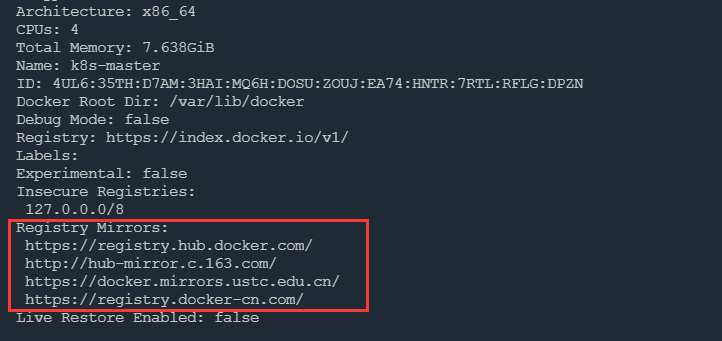
Docker Hub 镜像测速
解释# 测速前先移除本地的镜像!$ docker rmi nginx:latest# 使用 time 统计所花费的总时间。$ time docker pull nginx:latestPulling repository nginx
[...]

real   1m14.078s
user   0m0.176s
sys    0m0.120s
三、从指定repo拉取镜像
命令格式: library/<image:version>
解释$ docker pull busybox # 指定Repo拉取镜像,等价于:$ docker pull hub-mirror.c.163.com/library/busybox:latest$ docker pull docker.io/library/busybox:latest$ docker pull registry.hub.docker.com/library/busybox:latest
-ref
目录 返回
首页